2026年3月: Python 3.14新機能: InterpreterPoolExecutorで新しい並列処理を体験しよう
福田(@JunyaFff)です。2026年3月の「Python Monthly Topics」では、Python 3.14で追加された InterpreterPoolExecutor を紹介します。InterpreterPoolExecutor は concurrent.futures モジュールに追加された新しいExecutorで、プロセスを増やさずにGILの制約を回避し、CPUバウンドな処理を並列実行できます。
はじめに
Pythonで並行・並列処理を実装する際、標準ライブラリの concurrent.futures モジュールがよく使われます。
これまでは ThreadPoolExecutor(マルチスレッド)と ProcessPoolExecutor(マルチプロセス)の2つのExecutorが提供されてきましたが、Python 3.14で第3のExecutorとして InterpreterPoolExecutor が追加されました。
PythonにはGIL(Global Interpreter Lock)[1]という仕組みがあり、ThreadPoolExecutor ではCPUバウンドな処理を真に並列実行できないという制約がありました。
ProcessPoolExecutor はプロセスを分離することでGILを回避できますが、プロセス生成のオーバーヘッドが発生します。
InterpreterPoolExecutor は、各ワーカースレッドが独立したサブインタープリター上で動作することで、プロセスを増やすことなくGILの制約を回避し、真のマルチコア並列処理を実現します。
本記事では、既存のExecutorと比較しながら、InterpreterPoolExecutor の使い方と有用性を紹介します。
なお、InterpreterPoolExecutor は以前取り上げたサブインタープリターを活用する高レベルAPIです。サブインタープリターの詳細や、GILの制約を回避するもうひとつのアプローチであるfree threadingについては、本連載の過去記事で紹介していますので、ぜひ読んでみてください。
動作環境
本記事での動作確認環境は以下のとおりです。
Python 3.14.3
InterpreterPoolExecutor はPython 3.14で追加された機能のため、Python 3.14以降が必要です。公式ドキュメントは以下を参照してください。
3つのExecutorの概要
concurrent.futures モジュールの3つのExecutorの特徴を整理します。いずれも Executor クラスのサブクラスで、submit() や map() など同じインターフェースで利用できます。
Executor |
実行方式 |
GIL |
特徴 |
|---|---|---|---|
|
スレッド |
共有(制約あり) |
軽量。I/Oバウンド向き |
|
プロセス |
プロセスごとに独立 |
CPUバウンド向き。起動コスト大 |
|
スレッド+サブインタープリター |
インタープリターごとに独立 |
CPUバウンド向き。起動コスト小、データ転送も軽量 |
InterpreterPoolExecutor は ThreadPoolExecutor のサブクラスとして実装されています。各ワーカースレッドが独立したサブインタープリター上で動作し、サブインタープリターごとにGILが独立しているため、スレッドベースでありながら真の並列実行が可能です。
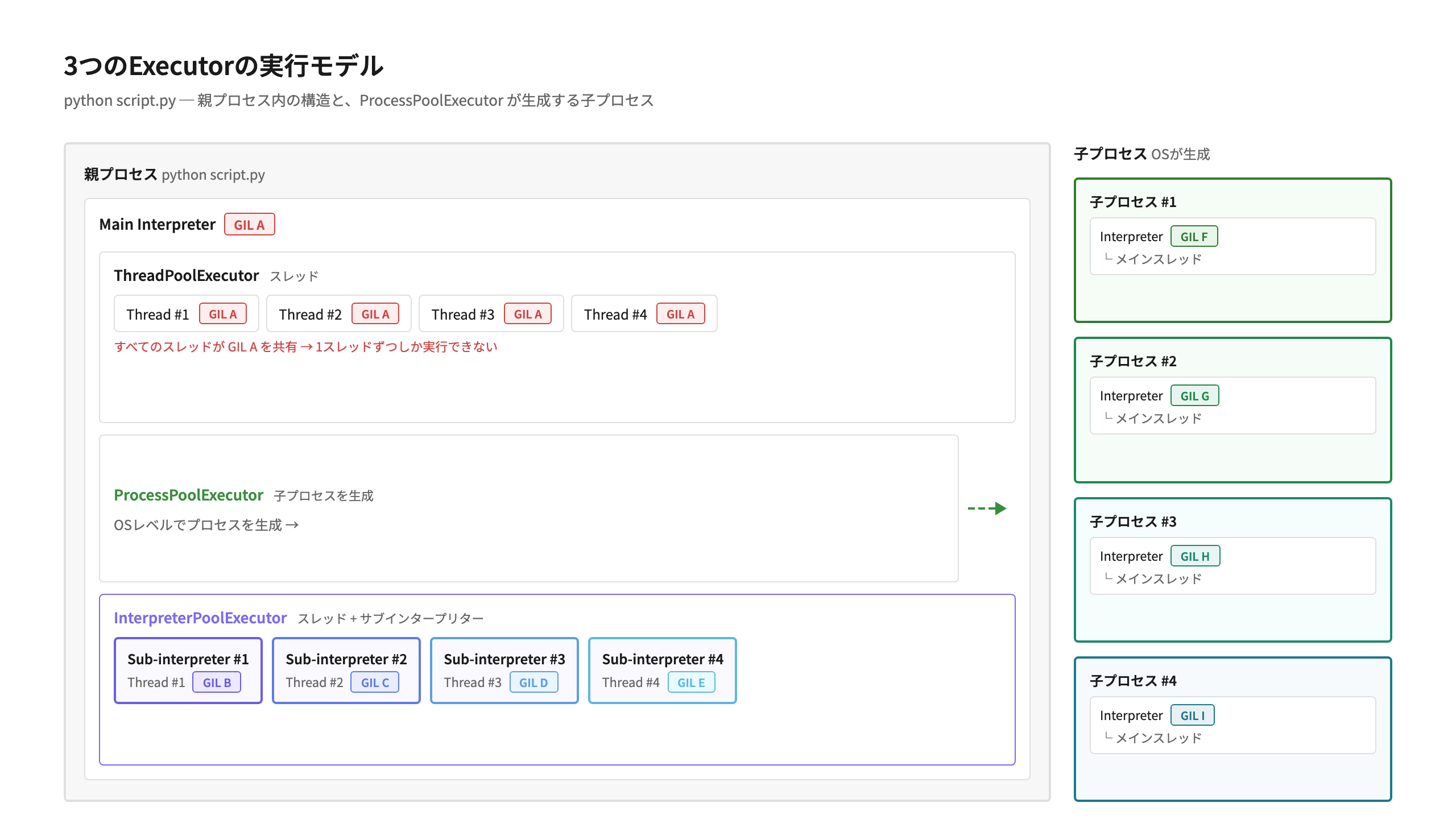
3つのExecutorの実行モデルを図にすると以下のようになります。
ThreadPoolExecutor ではすべて同一のGIL Aを利用し、 ProcessPoolExecutor ではメインプロセスの外側に子プロセスを作っています。 InterpreterPoolExecutor のスレッドは、メインプロセスの内部でサブインタープリターごとに別々のGIL B〜Eを利用しています。
3つのExecutorの実行モデル
InterpreterPoolExecutorを使用する
基本的な使い方(submit)
InterpreterPoolExecutor の使い方は、ThreadPoolExecutor や ProcessPoolExecutor と同じです。submit() メソッドで関数を登録し、Future オブジェクトの result() メソッドで結果を受け取ります。
from concurrent.futures import InterpreterPoolExecutor


def func(val1, val2, val3):  # submit()メソッドで実行する関数を定義
    return val1 + val2 + val3


def main():
    """InterpreterPoolExecutorのsubmit()メソッドでfunc()関数を実行する"""
    executor = InterpreterPoolExecutor(max_workers=1)
    future = executor.submit(func, 1, 3, 5)
    result = future.result()
    print(f"合計: {result=}")


if __name__ == "__main__":
    main()
$ python interpreter_submit.py
合計: result=9
ThreadPoolExecutor や ProcessPoolExecutor と同じコード構造で利用でき、import文のクラス名を変えるだけで切り替えられます。
map() メソッドで複数タスクを実行
map() メソッドを使えば、複数の引数に対して同じ関数をまとめて実行できます。結果は引数を渡した順序で返されます。
from concurrent.futures import InterpreterPoolExecutor


def square(n):
    """引数nの2乗を返す"""
    return n * n


def main():
    values = [1, 2, 3, 4, 5]
    with InterpreterPoolExecutor(
        max_workers=3
    ) as executor:  # withブロックを抜けると executor.shutdown() が呼ばれる
        results = executor.map(square, values)
    print(f"結果: {list(results)}")


if __name__ == "__main__":
    main()
$ python interpreter_map.py
結果: [1, 4, 9, 16, 25]
map() メソッドは、渡したイテラブルの要素数だけ関数を実行し、結果を引数の順序どおりに返します。Executorクラスは with 文を使うことで、処理の終了(shutdown())を意識せずに利用できます。
ベンチマークで特性を比較する
ここからは、3つのExecutorの特性をベンチマークで比較してみましょう。CPUバウンドな処理、起動コスト、データ転送の3つの観点から、それぞれの得意・不得意を見ていきます。
なお、以下のベンチマーク結果は筆者の環境(M2 MacBook Air、8コア、24GB RAM)でのローカル実行による参考値です。実行環境やタスク内容によって結果は異なります。
CPUバウンドな処理
以下のベンチマークでは、単純なループ計算を行う cpu_bound() 関数を8タスク・4ワーカーで並列実行しています。
import time
from concurrent.futures import (
    InterpreterPoolExecutor,
    ProcessPoolExecutor,
    ThreadPoolExecutor,
)


def cpu_bound(n: int) -> int:
    """CPUバウンドな処理: n回ループして計算を行う"""
    total = 0
    for i in range(n):
        total += i * i
        total %= 1_000_000_000
    return total


def run_benchmark(executor_class, n_tasks=8, n_iter=5_000_000):
    """指定されたExecutorでCPUバウンドな処理を並列実行し、処理時間を計測する"""
    start = time.perf_counter()
    with executor_class(max_workers=4) as executor:
        futures = [executor.submit(cpu_bound, n_iter) for _ in range(n_tasks)]
        [f.result() for f in futures]
    elapsed = time.perf_counter() - start
    print(f"{executor_class.__name__:30s}: {elapsed:.3f}秒")


if __name__ == "__main__":
    run_benchmark(ThreadPoolExecutor)
    run_benchmark(ProcessPoolExecutor)
    run_benchmark(InterpreterPoolExecutor)
$ python benchmark.py
ThreadPoolExecutor            : 2.473秒
ProcessPoolExecutor           : 0.780秒
InterpreterPoolExecutor       : 0.742秒
結果を表にまとめます。
Executor |
処理時間 |
備考 |
|---|---|---|
|
2.473秒 |
GILの制約により並列化されない |
|
0.780秒 |
並列化されるが、プロセス生成のオーバーヘッドあり |
|
0.742秒 |
並列化され、プロセス生成のオーバーヘッドもない |
ThreadPoolExecutor はGILの制約により、あるスレッドが cpu_bound() を実行している間は他のスレッドがPythonコードを実行できず、実質的に逐次実行となるためもっとも時間を要しています。ProcessPoolExecutor はプロセスごとにGILが独立して並列実行されるため、大幅に高速化されています。InterpreterPoolExecutor はスレッド上で動作しながらサブインタープリターごとにGILが独立して並列実行されるため、この実行結果ではプロセス生成がない分 ProcessPoolExecutor をわずかに上回って最速となりました。
起動コスト
CPUバウンドな処理では ProcessPoolExecutor と InterpreterPoolExecutor はほぼ同等の結果でした。では、起動コストはどうでしょうか。Executorの生成からワーカーの起動、すべてのタスクが完了するまでの時間を比較します。何もしない関数をワーカー数ぶん実行(例では4つのワーカーを起動)し、純粋な起動コストを測っています。
import time
from concurrent.futures import (
    InterpreterPoolExecutor,
    ProcessPoolExecutor,
    ThreadPoolExecutor,
)


def noop(x):
    """何もしない関数: 起動コストだけを測る"""
    return x


def run_benchmark(executor_class, n_workers=4):
    """Executorの生成からワーカー全起動・タスク完了までの時間を計測する"""
    start = time.perf_counter()
    with executor_class(max_workers=n_workers) as executor:
        # 全ワーカーを起動させるためにワーカー数ぶんのタスクを投入
        futures = [executor.submit(noop, i) for i in range(n_workers)]
        [f.result() for f in futures]
    elapsed = time.perf_counter() - start
    print(f"{executor_class.__name__:30s}: {elapsed:.4f}秒")


if __name__ == "__main__":
    run_benchmark(ThreadPoolExecutor)
    run_benchmark(ProcessPoolExecutor)
    run_benchmark(InterpreterPoolExecutor)
$ python benchmark_startup.py
ThreadPoolExecutor            : 0.0003秒
ProcessPoolExecutor           : 0.0770秒
InterpreterPoolExecutor       : 0.0305秒
ThreadPoolExecutor はスレッド生成のみなので起動コストはほぼゼロです。ProcessPoolExecutor はOSプロセスの生成とインタープリターの初期化が必要なためもっとも時間がかかっています。 InterpreterPoolExecutor はスレッド生成に加えてサブインタープリターの初期化がありますが、プロセス生成よりも軽く、ProcessPoolExecutor の半分以下の起動コストになっています。CPUバウンドな処理性能はほぼ同等でありながら、起動にかかるオーバーヘッドを大きく削減できる点がInterpreterPoolExecutor の大きな強みです。
データ転送コスト
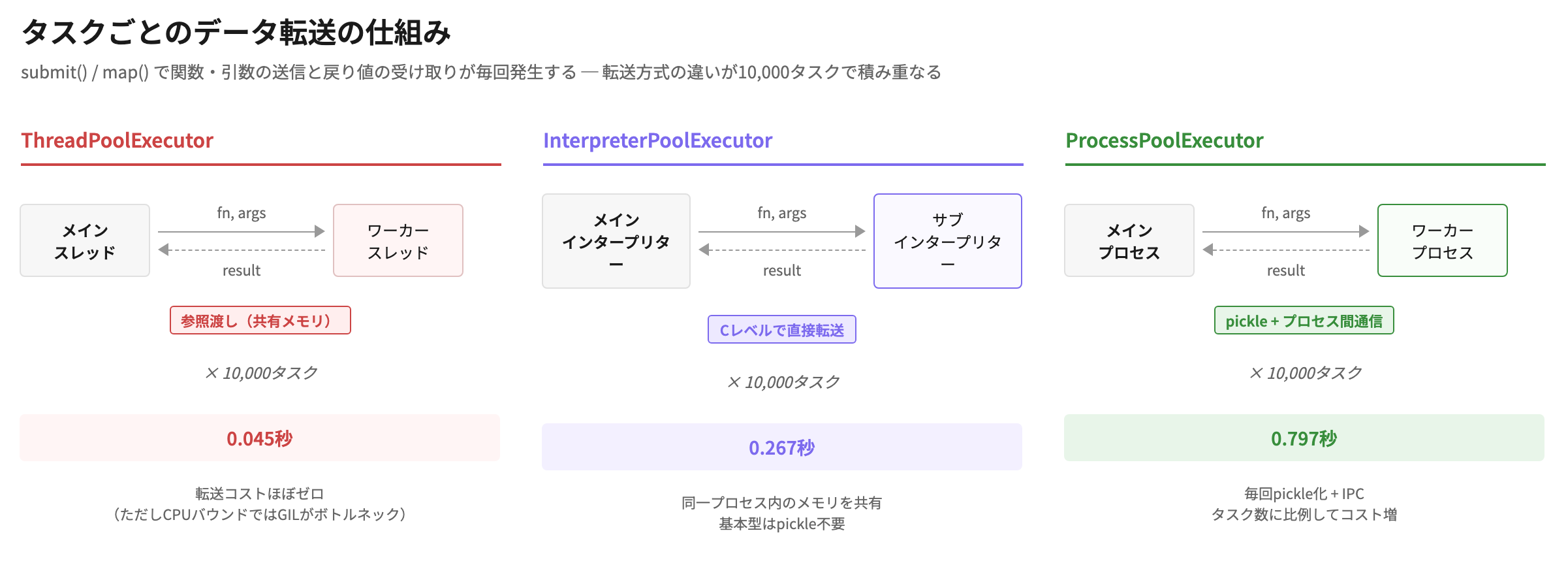
さらに、データ転送のオーバーヘッドにも違いがあります。submit() や map() でタスクを実行するたびに、関数・引数のワーカーへの送信と、戻り値の受け取りが発生します。1タスクあたりの処理を軽い関数(return x * 2)にして、タスク数を10,000に増やすことで、この転送コストが目立つケースを見てみましょう。
なお、計測区間にはExecutorの起動・終了も含まれますが、起動コストは前述の起動コストベンチマークと同じワーカー4つ(最大でも0.08秒程度)なので、処理時間の大部分は10,000タスクの転送の往復コストです。
import time
from concurrent.futures import (
    InterpreterPoolExecutor,
    ProcessPoolExecutor,
    ThreadPoolExecutor,
)


def double(x):
    """軽い処理: データ転送のオーバーヘッドが相対的に目立つ"""
    return x * 2


def run_benchmark(executor_class, n_tasks=10_000):
    """多数の軽いタスクを実行し、データ転送を含めた処理時間を計測する"""
    tasks = list(range(n_tasks))
    start = time.perf_counter()
    with executor_class(max_workers=4) as executor:
        _ = list(executor.map(double, tasks))
    elapsed = time.perf_counter() - start
    print(f"{executor_class.__name__:30s}: {elapsed:.3f}秒")


if __name__ == "__main__":
    run_benchmark(ThreadPoolExecutor)
    run_benchmark(ProcessPoolExecutor)
    run_benchmark(InterpreterPoolExecutor)
$ python benchmark_transfer.py
ThreadPoolExecutor            : 0.045秒
ProcessPoolExecutor           : 0.797秒
InterpreterPoolExecutor       : 0.267秒
ThreadPoolExecutor が速く、ProcessPoolExecutor が遅い結果になりました。ThreadPoolExecutor はスレッド間でメモリを共有しているため、データ転送のオーバーヘッドがほとんどありません。ただし、これはタスクの処理が軽いためGILの競合が目立たなかったからであり、先ほどのCPUバウンドなベンチマークではもっとも遅かったことを思い出してください。
InterpreterPoolExecutor は ProcessPoolExecutor の約3倍速い結果になっています。この差が生まれる理由は、データ転送の仕組みの違いにあります。ProcessPoolExecutor はプロセスが分離されているため、関数の引数(int)や戻り値をすべてpickleでバイト列に変換し、プロセス間通信で転送する必要があります。
一方、InterpreterPoolExecutor は同一プロセス内で動作しており、intのような基本型はCレベルのプロセスメモリを介して直接受け渡しできます。pickleによるシリアライズが不要なぶん、1タスクあたりの転送コストが小さく、タスク数が多いほどこの差が効いてきます。
タスクごとのデータ転送の仕組み
各Executorの使い所
ベンチマーク結果を踏まえて、3つのExecutorの使い分けを整理します。
ユースケース |
推奨Executor |
理由 |
|---|---|---|
I/Oバウンドな処理(HTTP、DB等) |
|
GILはI/O待ち中に自動で解放されるため影響が小さい。 |
CPUバウンドな処理を軽量に並列化 |
|
プロセスを増やさずにGILを回避できる。起動コスト・データ転送ともに軽量 |
C拡張がサブインタープリターに未対応 |
|
NumPy等のC拡張はサブインタープリターで読み込めない場合がある[2] |
完全なプロセス分離が必要 |
|
メモリリーク対策でワーカーをリフレッシュしたい場合など |
InterpreterPoolExecutor は「ThreadPoolExecutor ではGILがボトルネックになるが、ProcessPoolExecutor ほどプロセス生成やメモリのオーバーヘッドをかけたくない」というケースにちょうどよい選択肢です。特に、コンテナやサーバーレス、組み込み・エッジデバイスなどリソースに制約のある環境では、プロセスを増やさずに並列化できるメリットが大きくなります。
なお、NumPyなどのC拡張がサブインタープリターに未対応の場合、InterpreterPoolExecutor のワーカー内で import すると ImportError になります。
from concurrent.futures import InterpreterPoolExecutor

def use_numpy(x):
    import numpy as np  # ← サブインタープリターでの読み込みに失敗する
    return float(np.sum(np.array([x, x, x])))

with InterpreterPoolExecutor(max_workers=1) as executor:
    future = executor.submit(use_numpy, 5)
    print(future.result())
    # ImportError: module numpy._core._multiarray_umath
    #   does not support loading in subinterpreters
このようなライブラリを使ったCPUバウンドな処理を並列化するには、ProcessPoolExecutor を使用してください。
サブインタープリターに転送できるオブジェクト・できないオブジェクト
InterpreterPoolExecutor で submit() や map() を呼び出すと、関数・引数・戻り値がメインインタープリターからサブインタープリターへ転送されます。このとき、サブインタープリターに転送できるオブジェクトとできないオブジェクトがあります。
転送できるオブジェクトの代表例は以下のとおりです。
基本型(int, str, float, bytes, bool, tuple等)
モジュールレベルで定義された関数・クラス
ステートレスなローカル関数(外側のスコープの変数をキャプチャしていない関数)
一方、以下はサブインタープリターに転送できず、エラーになります。
クロージャ(外側のスコープの変数をキャプチャした関数)
束縛メソッド(インスタンスメソッド)[3]
ファイルオブジェクトやソケットオブジェクト
実際にコードで確認してみましょう。
from concurrent.futures import InterpreterPoolExecutor


def add(a, b):
    """モジュールレベルで定義された関数"""
    return a + b


def main():
    with InterpreterPoolExecutor(max_workers=1) as executor:
        # 1. モジュールレベルの関数: OK
        future = executor.submit(add, 3, 5)
        print(f"add(3, 5) = {future.result()}")

        # 2. ローカル関数(ステートレス): OK
        def local_add(a, b):
            return a + b

        future = executor.submit(local_add, 3, 5)
        print(f"local_add(3, 5) = {future.result()}")

        # 3. クロージャ(外側の変数をキャプチャ): NG
        offset = 10

        def add_with_offset(a, b):
            return a + b + offset

        try:
            future = executor.submit(add_with_offset, 3, 5)
            print(f"add_with_offset(3, 5) = {future.result()}")
        except Exception as e:
            print(f"クロージャのエラー: {type(e).__name__}")


if __name__ == "__main__":
    main()
$ python pickle_check.py
add(3, 5) = 8
local_add(3, 5) = 8
クロージャのエラー: NotShareableError
モジュールレベルの add() 関数と、main() 内で定義したステートレスな local_add() 関数はどちらも実行できています。一方、外側の変数 offset をキャプチャしたクロージャ add_with_offset() はサブインタープリターに転送できずエラーになります。
ポイントは「ローカル関数かどうか」ではなく、「外側のスコープの変数をキャプチャしているかどうか」です。パラメータだけを使うステートレスな関数であれば、定義場所にかかわらず転送できます。
注釈
InterpreterPoolExecutor は、関数や引数を常にpickleでシリアライズするわけではありません。int, str等の基本型はネイティブに転送され、ステートレスな関数はコードオブジェクトが直接転送されます。pickleはこれらで扱えないオブジェクト(カスタムクラスのインスタンス等)に対するフォールバックとして使われます。
では、submit() / map() の引数・戻り値ではなく、ワーカー同士でデータをやりとりしたい場合はどうすればよいでしょうか。
サブインタープリター間の通信 ─ PEP 734
InterpreterPoolExecutor の submit() / map() メソッドでは、関数の引数と戻り値は自動的にサブインタープリターとの間で転送されるため、通常の利用では転送の仕組みを意識する必要はありません。
ただし、各サブインタープリターは独立した実行環境であり、オブジェクトを直接共有することはできません。ワーカー間でデータをやりとりしたい場合は、PEP 734 -- Multiple Interpreters in the Stdlibで標準化された concurrent.interpreters モジュールが提供するキュー(create_queue())を利用します。
create_queue() で作成したキューは、InterpreterPoolExecutor と組み合わせて使えます。以下の例では、2つのワーカー(=別々のサブインタープリター)がキューを介してデータをやりとりしています。
from concurrent.futures import InterpreterPoolExecutor
from concurrent import interpreters


def producer(queue):
    """サブインタープリター上で動き、計算結果をキューに入れる"""
    for i in range(5):
        queue.put(i * i)


def consumer(queue):
    """別のサブインタープリター上で動き、キューからデータを受け取る"""
    results = []
    for _ in range(5):
        results.append(queue.get())
    return results


def main():
    queue = interpreters.create_queue()
    with InterpreterPoolExecutor(max_workers=2) as executor:
        # producer と consumer が別々のサブインタープリターで実行される
        executor.submit(producer, queue)
        future = executor.submit(consumer, queue)
        print(f"結果: {future.result()}")


if __name__ == "__main__":
    main()
$ python queue_workers.py
結果: [0, 1, 4, 9, 16]
producer() と consumer() はそれぞれ別のサブインタープリター上で実行されます。メインインタープリターで作成したキューを submit() の引数として渡すことで、サブインタープリター同士が直接データをやりとりできます。
サブインタープリター間の通信の詳細は、以下のドキュメントを参照してください。
まとめ
本記事では、Python 3.14で追加された InterpreterPoolExecutor を紹介しました。
InterpreterPoolExecutor は、各ワーカースレッドが独立したサブインタープリター上で動作することで、GILの制約を回避しながら ProcessPoolExecutor による複数プロセスでの並列処理より、軽量な並列処理を実現します。ThreadPoolExecutor や ProcessPoolExecutor と同じインターフェースで利用できるため、既存のコードからの移行も容易です。ただし、NumPyなどサブインタープリターに未対応のC拡張を使う場合は ProcessPoolExecutor が必要になる点には注意してください。
Pythonの並列処理は、free threadingと合わせて、Python 3.14で大きく進化しています。まずは手元のCPUバウンドな処理で InterpreterPoolExecutor を試してみてください。